Remove NSF Security
- Ensuring Better Solution to Open NSF Files
- Removes ACL from NSF Files for Restriction Free Data Access
- Help to Open and Read NSF File Without Restriction
- Avoid Trouble of Error Message While Accessing NSF Files

Ever wondered why this message pops up when you try to access NSF file database? This is because the file you are trying to access is protected with set of permissions that are restricting you to open the database. So you need to remove NSF Security for accessing your NSF File.Now, you must be thinking of is there any solution to Remove Lotus Notes Local access Protection and our answer to the question is Yes! With our NSF local Security Remover tool, you are rendered with an ease-promising solution to erase Lotus Notes NSF file restrictions.
With absolute simplicity offered through the interface of the software, we aid our users to open NSF database in urgent situations. With our local NSF restriction breaker, security on database of Lotus Notes (5.0, 7.0, 6.5 8.0 and 8.5, 9.0) can be removed with convenience, in few clicks. The software turns up as a huge help in situations when the administrator of the NSF file is not available and the database is to be accessed for accomplishment of critical tasks.
IBM Lotus Notes is acclaimed for its reliable security services. A feature called Access Control Rights (ACL) is built-in with the application that allows users to apply a set of restrictions on database so that it is protected from unauthorized usage. So, when a user tries to open the NSF file database without appropriate permissions, error message is encountered that informs that unauthorized attempt to access database is made. This generally gives an indication that there is need to remove NSF security in order to open encrypted Lotus Notes database.
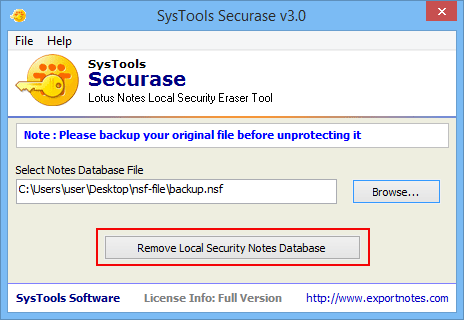
However, this attribute in Notes is very useful but in various situations creates problem when there is need to access the data in absence of file administrator. Our Securase software gives a set up that will help even a novice user to erase Lotus Notes NSF file restrictions in simple steps. Available at a reasonable price, the software is a fair deal to be made to gain access over NSF file database.
Easy To operate Solution: The software is framed with single-panel-interface which means all you need to do is provide required credentials on single page and execute required process within minimum time utilization
Support to Windows OS: Our tool to remove NSF security can be installed on any of the machine running on Windows Operating System. Also, security from NSF files created with any of the Lotus Notes edition is possible
Fix Error Messages Effectively: Errors like “you are not authorized to access that database†can be fixed with our solution for Lotus Domino delete database security. The software helps in quick access over the Notes database.
Software working can be analyzed with its trial version that gives a chance to operate the software and work with NSF file set with permissions. Download Remove NSF Security that is embedded with sample NSF file but you can to save it as complete process version. You can use the file to evaluate potential of the tool to open encrypted Lotus Notes database.
If you find results of software convincing in demo version, then move ahead and make an investment in full version of our solution to remove NSF security. The licensed edition gives you the advantage to open your own NSF file data base set with permissions.
 " You are not authorized to access that database " - This error message troubled us a lot when the NSF files were tried to be accessed. Securase software provided the generic method of removing the local restriction from NSF file and we are now having the free of restriction NSF files. Thanks for the software solution provided for this affordable price tag.
- Alexander.F. W, Germany

